My Mac was close to 100% full. macOS was complaining and I couldn’t install updates. Here’s how I used Claude to analyse my disk usage and safely free 200GB.
System specs Link to heading
- Machine: MacBook Pro M4 Pro (24GB RAM)
- Disk: 494GB SSD
- macOS: 26.1 (developer preview)
- Before: 487GB used (98.5% full, 7GB free)
- After: 274GB used (55% full, 220GB free)
TLDR Link to heading
Freed 200GB by cleaning:
- Docker (108GB): volumes, images, build cache
- Python venvs (17GB): recreatable with
poetry install - Old test results (3GB): stale performance test data
- Dev caches (10GB): poetry, pip, go, homebrew, playwright, spotify
- LLM models (7GB): unused GPT4All models
- Old editor configs (5GB): cursor, windsurf, code-insiders
- Podman containers (6GB): unused container runtime
- Unused apps (5GB): discord, firefox, zen, strawberry, bloop, jetbrains
- iOS simulator caches (2.6GB): user-level simulator data
Result: 98.5% full → 55% full.
Using Claude to plan the cleanup Link to heading
I used Claude Code’s plan mode to analyse disk usage and create a cleanup strategy before deleting anything. This meant:
- Claude explored the filesystem to identify what was using space
- It presented a detailed plan showing what it would delete and why
- I reviewed and approved the plan before any deletions happened
- Claude executed the cleanup step by step
This approach is safer than blindly running cleanup commands. Having an AI verify what’s safe to delete - and importantly, what not to delete - gave me confidence I wouldn’t break running projects or lose important data.
For destructive operations like this, plan mode is invaluable. You get the speed and thoroughness of AI exploration with human oversight at the critical decision point.
Finding the culprits Link to heading
Started by checking overall disk usage:
df -h /
Then found the big directories:
du -sh ~/* 2>/dev/null | sort -hr | head -20
The usual suspects:
~/Library: 83GB~/Code: 31GB~/Pictures: 15GB
Drilling into Library:
du -sh ~/Library/* 2>/dev/null | sort -hr | head -20
Application Support (35GB) and Caches (20GB) stood out immediately.
Docker cleanup: 108GB Link to heading
Docker was the biggest culprit. Check what it’s using:
docker system df
Mine showed:
- Images: 87GB (46GB reclaimable)
- Volumes: 47GB (47GB reclaimable - 99%!)
- Build Cache: 51GB (21GB reclaimable)
I’ve written about Docker cleanup before, but this was extreme. The volumes were almost entirely unused - probably from old postgres/redis containers I’d stopped months ago.
Prune volumes (⚠️ this deletes databases):
docker volume prune -af
Freed 47.6GB. Brutal but necessary.
Remove unused images:
docker image prune -af
Freed 8.8GB. Would’ve been more, but I had running containers using some images.
Clear build cache:
docker builder prune -af
Freed 51.2GB. Build cache accumulates quickly if you’re building images regularly.
Total Docker cleanup: 107.6GB
New state:
TYPE            TOTAL     ACTIVE    SIZE      RECLAIMABLE
Images          3         3         2.6GB     2.6GB (100%)
Containers      6         5         3MB       3MB (97%)
Local Volumes   6         6         174MB     0B (0%)
Build Cache     0         0         0B        0B
Python virtual environments: 13GB Link to heading
I had a work repo with 7 subdirectories, each containing a ~2GB python venv. These are trivially recreatable with poetry install, so I deleted them:
# In the repo root
rm -rf src/*/.venv .venv
Same pattern across other repos. Python venvs are huge and rarely need to be kept.
Old test results: 3GB Link to heading
Found a perf-tests directory with locust performance test results from August:
locust_results/: 1GB- Multiple backup directories: 2GB
.locust_results/: 325MB
All stale data from load testing experiments. Deleted:
rm -rf perf-tests/locust_results perf-tests/locust_backup_* perf-tests/.locust_results perf-tests/.venv
Development caches: 10GB Link to heading
Multiple cache directories that can safely be cleared:
Poetry cache (3.8GB):
poetry cache clear --all pypi -n
pip cache (2.5GB):
pip cache purge
Go build cache (2.7GB):
go clean -cache -modcache
Homebrew (2GB):
brew cleanup
This removed cached downloads for mysql, protobuf, linear, and seven old versions of Claude (1.4GB total). Homebrew keeps every cask you’ve ever installed.
Playwright browsers (1.9GB):
rm -rf ~/Library/Caches/ms-playwright
Spotify cache (1.8GB):
rm -rf ~/Library/Caches/com.spotify.client
LLM models: 7GB Link to heading
Found ~/Library/Application Support/nomic.ai containing 7.2GB of GPT4All models. I’d installed gpt4all months ago to try local LLMs, never used it again.
rm -rf ~/Library/Application\ Support/nomic.ai
Old editor configs: 5GB Link to heading
I’d switched from Cursor to VSCode, then to Zed, leaving behind:
- Cursor: 700MB
- Windsurf: 252MB
- Code - Insiders: 521MB
Plus their associated caches. Removed:
rm -rf ~/Library/Application\ Support/Cursor ~/Library/Application\ Support/Windsurf ~/Library/Application\ Support/Code\ -\ Insiders
Also cleared the pypoetry cache that somehow survived the first attempt (3.7GB).
Additional cleanup rounds Link to heading
After the initial cleanup, I went back and found more:
Podman containers (6GB):
rm -rf ~/.local/share/containers
Podman is another container runtime like Docker. I had 6GB of old container images and volumes from experiments I’d forgotten about.
More Python venvs (4GB):
rm -rf ~/Code/work/project-a/.venv
rm -rf ~/Code/work/project-b/.venv
We’d missed a work repo in the first pass. Two more 2GB venvs easily recreatable with poetry install.
Unused apps (~1.5GB):
rm -rf ~/Library/Application\ Support/discord  # 567MB - don't use it
rm -rf ~/Library/Caches/Firefox  # 164MB
rm -rf ~/Library/Application\ Support/Firefox
rm -rf ~/Library/Application\ Support/zen  # 412MB - zen browser I'd tried once
rm -rf ~/Library/Application\ Support/strawberry  # 206MB - music player
rm -rf ~/Library/Application\ Support/Antigravity  # 141MB
rm -rf ~/Library/Application\ Support/pyppeteer  # 187MB - python browser automation
rm -rf ~/Library/Application\ Support/JetBrains  # 211MB - don't use pycharm
rm -rf ~/Library/Application\ Support/ai.bloop.bloop  # 210MB - old code search tool
More dev caches (~3GB):
rm -rf ~/Library/Application\ Support/virtualenv  # 784MB
rm -rf ~/Library/Caches/com.anthropic.claudefordesktop.ShipIt  # 490MB
rm -rf ~/Library/Caches/notion.id.ShipIt  # 267MB
rm -rf ~/Library/Caches/Jedi  # 349MB - python autocomplete
rm -rf ~/Library/Caches/typescript  # 180MB
rm -rf ~/Library/Caches/ms-playwright-go  # 127MB
python3 -m pip cache purge  # 2.7GB - worked this time
iOS simulator caches (2.6GB):
rm -rf ~/Library/Developer/CoreSimulator
rm -rf ~/Library/Developer/XCPGDevices
User-level iOS simulator data. The system-level /Library/Developer/CoreSimulator (14GB) was protected by SIP and couldn’t be deleted.
Downloads folder cleanup (~26MB): Old test videos, coverage reports, work PDFs from 2023-2024.
What I didn’t delete Link to heading
macOS update snapshots: Found 3 APFS snapshots with diskutil apfs listSnapshots /, but they were all marked Purgeable: No and attempts to delete them failed. These are rollback points for system updates. macOS protects them for good reason.
Docker app itself: The ~/Library/Group Containers/com.docker.docker directory (6GB) is Docker Desktop itself, not cached data. Deleting this would break Docker.
Active project dependencies: Only deleted venvs I knew I could recreate. Never delete node_modules or venvs for projects you’re actively working on unless you’re certain you can rebuild.
System iOS simulator (14GB): /Library/Developer/CoreSimulator was protected by System Integrity Protection (SIP). Even sudo rm -rf failed with “Operation not permitted”. Would need to boot into recovery mode, disable SIP, delete it, re-enable SIP, and reboot. Not worth the hassle for 14GB of orphaned data from an old Xcode installation.
Claude project history (2.3GB): ~/.claude/projects contains conversation transcripts from Claude Code sessions. Valuable for reference, explicitly keeping these.
Final result Link to heading
Before:
- 487GB used (98.5%)
- 7GB available
After:
- 274GB used (55%)
- 220GB available
Total freed: 200GB
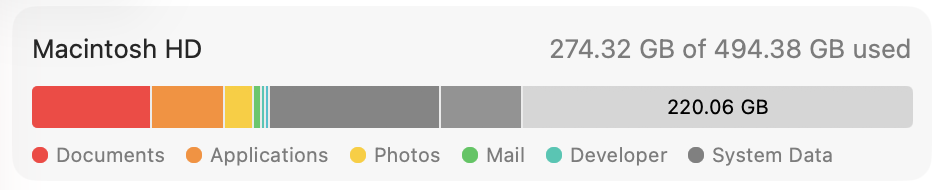
The cleanup happened in phases - initial Docker and cache cleanup freed about 150GB, then additional rounds targeting unused apps, podman containers, more Python venvs, and old test artifacts added another 75GB.
What’s still using space Link to heading
After cleanup, here’s what remains:
~/Library (76GB):
- com.apple.container: 10GB (system containers)
- VSCode: 3.6GB
- Notion: 2.4GB
- Slack: 1GB
- Various editors/apps: ~10GB
- pip cache (again): 2.5GB
~/Code (31GB):
- Work repos: 30GB
- Personal projects: 1GB
~/Pictures (15GB): photos
~/Movies (5.6GB): videos
System (~120GB): macOS, applications, logs
Most of this is legitimate. I could probably squeeze another few GB out of app caches, but 202GB free is plenty.
Lessons learnt Link to heading
Docker volumes are sneaky. They persist after containers are removed and can eat tens of gigabytes. Run
docker system dfregularly.Python venvs are huge. A single venv can be 2GB+. Delete them if you’re not actively using the project - they’re trivially recreatable.
Homebrew never forgets. It keeps every cask version you’ve ever installed.
brew cleanupshould be part of regular maintenance.Build caches accumulate silently. Docker build cache, Go build cache, Poetry cache - they all grow unbounded. Schedule periodic cleanups.
Apps leave behind configs. When you stop using an editor, uninstall it properly or manually delete its Application Support directory.
Test data piles up. Old performance test results, local databases, temporary files from experiments - these are easy to forget about.
AI can help with destructive operations. Using Claude’s plan mode meant I got thorough filesystem analysis without the risk of accidentally deleting something important. The AI identified what was safe to delete and explained why, then waited for approval before executing. Much safer than running cleanup scripts blindly.
Iterative cleanup finds more. After the initial Docker/cache cleanup freed 150GB, going back and asking “what else?” found another 75GB. Apps I’d forgotten about, podman containers I didn’t know existed, more Python venvs in repos I’d missed. Multiple passes catch more than a single sweep.
iOS simulator data exists in two places. There’s user-level (
~/Library/Developer/CoreSimulator) and system-level (/Library/Developer/CoreSimulator). The user-level caches can be deleted normally, but the system-level data is protected by System Integrity Protection (SIP). Evensudo rm -rffails with “Operation not permitted”. This is orphaned data from old Xcode installations that macOS won’t let you remove without disabling SIP in recovery mode. Not worth the hassle - just be aware those 14GB exist and can’t be easily reclaimed.
Automation ideas Link to heading
To prevent this happening again:
Docker cleanup cron job:
# Weekly cleanup of unused Docker resources
0 2 * * 0 docker system prune -af --filter "until=168h"
Shell alias for quick checks:
alias disk-hogs='du -sh ~/* ~/Library/* 2>/dev/null | sort -hr | head -20'
Poetry/pip cleanup script:
#!/bin/bash
poetry cache clear --all pypi -n
pip cache purge
go clean -cache -modcache
brew cleanup
I’d recommend checking disk usage monthly. It’s much easier to clean up 10GB regularly than suddenly need to find 200GB.