I ran /context in Claude Code and found my memory files eating 49.5k tokens before I’d typed a single word. I’d assumed those files loaded only when relevant. They were loading in full, every session. After moving them to the managed memory directory and disabling one plugin I never use, startup context dropped from 82.1k to 37.2k.
Before Link to heading
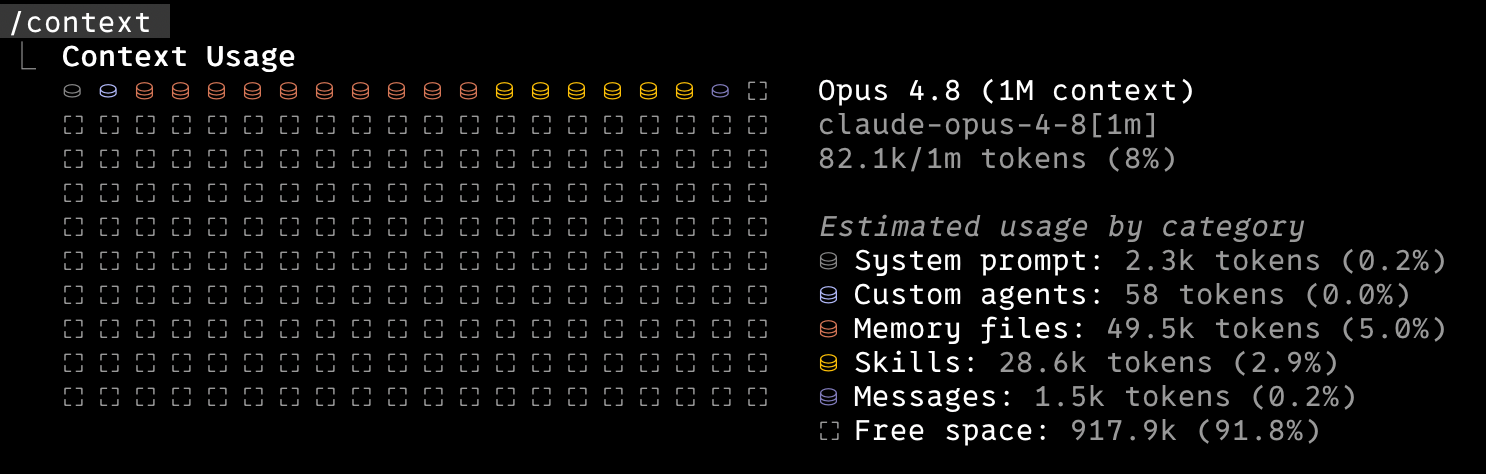
The two big line items were memory files and skills. 49.5k of that was 69 personal memory files, one fact per file: tone preferences, git habits, work conventions, the usual accumulated notes.
Where I was wrong Link to heading
I had a ~/.claude/CLAUDE.md that imported an index file, which in turn imported all 69 memories with the @ syntax:
# MEMORY.md
@~/.claude/memory/user_profile.md
@~/.claude/memory/feedback_no_em_dashes.md
... 67 more
I believed this was progressively disclosed, that each file loaded only when a task touched it. I asked Claude whether the setup was sound and got a confident “yes, correct by design” more than once. The answer changed after I checked the docs and ran ls on the directories.
The Claude Code memory docs settle it:
Imported files are expanded and loaded into context at launch alongside the CLAUDE.md that references them. Imported files can recursively import other files, with a maximum depth of four hops.
@ imports are eager and recursive. Every file in that chain loads at startup whether or not the session ever needs it. By writing that index, I turned a lazy-by-default system into an eager one.
Two memory systems Link to heading
Claude Code has a separate lazy-loading system called auto memory. It lives in ~/.claude/projects/<project-slug>/memory/. Only the index (MEMORY.md, first 200 lines or 25KB) loads at startup. The individual topic files load on demand when Claude reads them during a session.
My 69 files sat in a different directory, ~/.claude/memory/, force-loaded by the hand-written @ chain. The managed auto-memory directory was sitting empty. I was paying the eager cost while the lazy machinery went unused.
What I changed Link to heading
Move the files into the managed directory and stop importing them by hand.
mv ~/.claude/memory/*.md ~/.claude/projects/<project-slug>/memory/
Then I rebuilt MEMORY.md as a plain index, one line per memory with a short hook, rather than a list of @ imports:
- [feedback_no_em_dashes](feedback_no_em_dashes.md): Never use em-dashes in any output
- [user_communication_tone](user_communication_tone.md): Tone for messages on my behalf
The @ prefix is the difference. With it, the file is inlined at launch. Without it, the line is a pointer that the recall system surfaces when it judges the file relevant. I also removed the now-dead @MEMORY.md line from CLAUDE.md and a couple of stale references that still pointed at the old directory.
There is a trade-off. Eager import keeps a rule in context on each turn. Recall is good but not certain, so a behavioural rule can sometimes fail to surface. For the handful of rules I never want skipped, I’d keep those inline in CLAUDE.md itself. The bulk that only matters in context moved to recall.
The skills side Link to heading
Skills behave better than I feared. Only each skill’s name and description load at startup, not the body, so the catalogue is already progressively disclosed. The 28.6k was the cost of having 192 skills installed across many plugins. The single largest block came from one analytics plugin I’d never invoked, around 130 skills on its own. Disabling that plugin in settings.json was the lever:
"some-plugin@marketplace": false
Pruning is plugin-level, not per-skill. Set it to false to drop the whole block from the catalogue while keeping the cache, so re-enabling later is instant.
After Link to heading
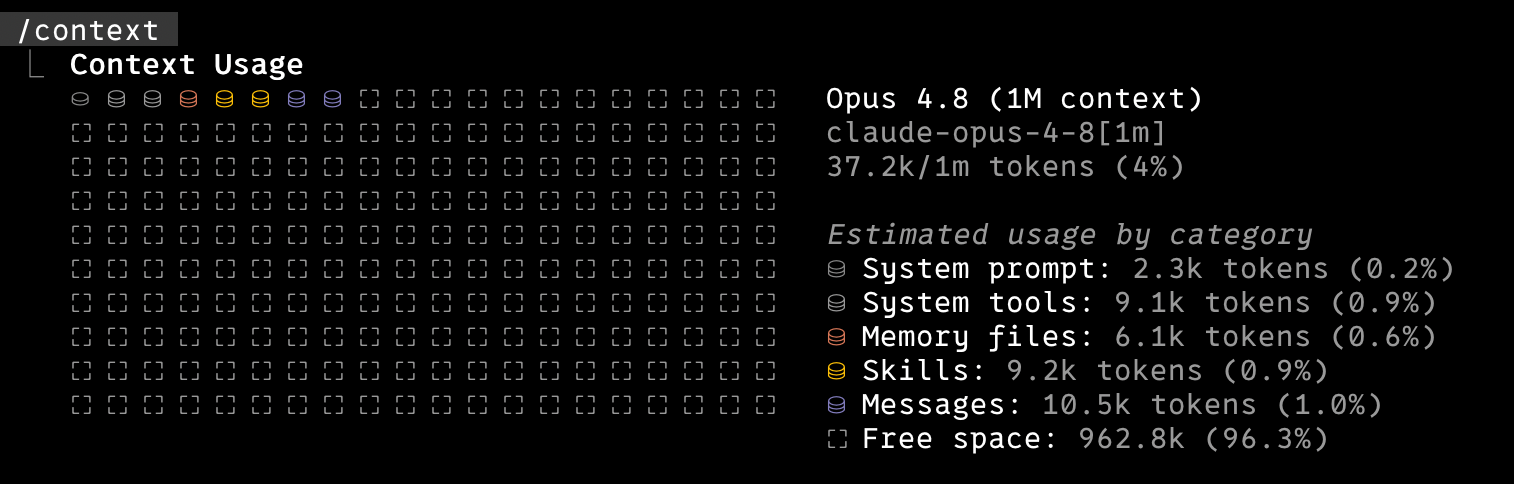
Memory files don’t hit zero, since the index plus whatever a session loads still counts. I now pay roughly for what a session touches rather than for the whole accumulated pile.
What I took from it Link to heading
I try to check /context now and then. The figure grows as I add memories and plugins, and the expensive part can be a default I didn’t set deliberately. The bit that stuck with me was simpler: I leaned on confident answers from myself and the assistant instead of checking the docs and the directory first. Listing the directory and reading the docs gave me the answer the confident replies hadn’t.
Update: the fix that wasn’t (1 July 2026) Link to heading
A few days later my usual workflow felt off in every work repo. None of my git, PR or tone rules were firing. I had mistaken a smaller number for a working setup.
I glossed over a line above. Auto memory is scoped to ~/.claude/projects/<project-slug>/memory/, and recall only surfaces files from the current project’s directory. My files had landed under the slug for my home directory, so they load when I sit in ~ and nowhere else. In my work tree and every repo under it, the index never loaded, let alone the bodies. Some of the token drop was the memories going dark where I do my work.
This is the same mistake the post is about, one layer down. I trusted the result instead of checking behaviour where it mattered. /context in my home directory looked great. /context inside a project would have shown the memories missing.
The fix is two changes:
Re-import the index, not the bodies. A single
@~/.claude/projects/<home-slug>/memory/MEMORY.mdback in~/.claude/CLAUDE.mdloads the one-line catalogue in every session regardless of directory. It stays cheap becauseMEMORY.mdlinks its entries with plain[name](name.md)markdown, not@, so only the index text loads and the individual files stay out. The token win survives and the catalogue is present everywhere.Split global from project-specific. Cross-project rules (tone, git, PR habits) stay in the home memory directory. Work-specific ones (infra conventions, tracker workflow) moved to the project’s own memory directory, imported by a
CLAUDE.mdat the top of that project tree. EachMEMORY.mdline now carries the rule itself, so the always-loaded index covers the common case and the file holds the detail.
The second import earns its place. My work tree is not a git repo itself, it is a plain folder holding many separate clones, each its own repo with its own project slug. Auto memory keys on the slug of the current directory, so inside one of those nested repos the harness loads that repo’s memory, not the shared one a level up. CLAUDE.md discovery works the other way: it walks up the filesystem and ignores git boundaries, so a CLAUDE.md at the top of the tree loads in every repo beneath it. One @import of the shared index in that file carries the memories across the whole tree. At the exact root both mechanisms fire, so the index loads twice, a few harmless duplicate lines.
The shape I landed on:
~/.claude/
  CLAUDE.md                       @import <home-slug>/memory/MEMORY.md   (loads everywhere)
  projects/
    <home-slug>/memory/           global rules: tone, git, PR habits
      MEMORY.md                   one-line index, always loaded
      *.md                        detail, recalled on demand
    <project-slug>/memory/        project rules: infra, tracker workflow
      MEMORY.md
      *.md

~/Code/<project>/                 plain folder, NOT a git repo
  CLAUDE.md                       @import <project-slug>/memory/MEMORY.md
  repo-a/  (.git)                 the CLAUDE.md above still loads here
  repo-b/  (.git)                 ...and here, across the .git boundary
Back in a work repo, /context now shows the memories loading:
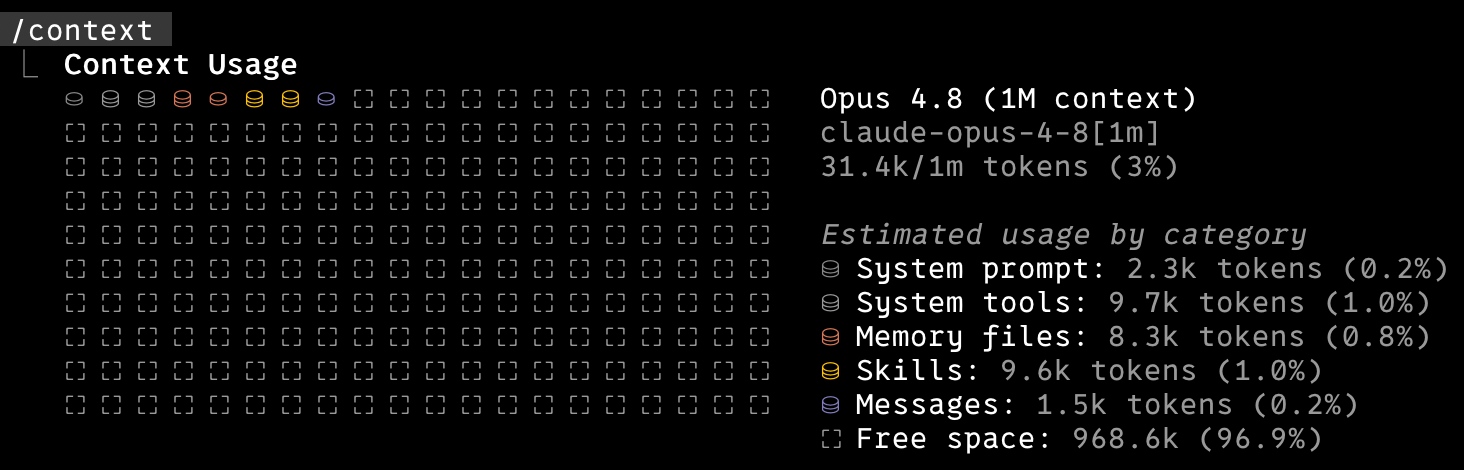
Memory files sit at 8.3k, a little above the 6.1k I reported, because the shared index now loads in every session rather than nowhere useful. I wanted that trade. My rules apply in every repo for a small, fixed cost.
| Category | Before | After | After the split |
|---|---|---|---|
| Memory files | 49.5k | 6.1k | 8.3k |
| Skills | 28.6k | 9.2k | 9.6k |
| Total | 82.1k | 37.2k | 31.4k |
The first two columns were measured in my home directory, where the broken setup happened to look its best. The third is inside a work repo, after the fix.
I have not lived with this split for long, so treat it as a hypothesis rather than a proven fix. The real test comes weeks from now: whether a rule I need still fires inside a work repo. I have not seen that happen yet. So far the early signs look good, and I am hopeful.
The lesson holds, one turn sharper. I read the docs the first time but still didn’t check the behaviour where it counted.
Further reading Link to heading
- Claude Code memory docs - imports, auto memory, and the loading rules
- Pruning Claude Code conversation history - a different kind of Claude Code bloat, on disk rather than in context