TL;DR Link to heading
I run a WireGuard server on a spot f1-micro in London and keep it stopped when I’m not using it; it stops itself 5 minutes after the last device disconnects. A small Cloud Run function starts or stops the VM and points a DNS name at its new IP, so my laptop and iPhone both connect to vpn.example.com. From the laptop, traffic flows within about a minute of asking for it; on the phone, opening WireGuard starts the VM and I toggle the tunnel on once a notification says it’s up. By my sums from Google’s list prices, it costs about $0.48/month stopped and about $0.0034/hour running, with the first 200 GiB of traffic each month free on the Standard network tier. Upgrading to Premium networking or an e2-micro costs more and didn’t make it faster in my tests. The code is in brtkwr/on-demand-vpn.
Motivation Link to heading
I wanted a VPN exit in a country of my choosing that I control, without a monthly subscription. Some of the uses I had in mind:
- Streaming services that block VPNs. Home-country TV services often block the IP ranges of well-known commercial VPNs, since thousands of people share a handful of addresses and those addresses end up on block lists. A VM of my own has an IP that only I use, so it doesn’t appear on those lists. Cloud provider ranges are public though, and some services block whole data-centre ranges, so this may still fail. I haven’t tested it against any particular service, and the service’s terms still apply.
- Untrusted Wi-Fi. Hotel and café networks see an encrypted tunnel to London instead of my traffic.
- Checking what a site looks like from another country. Geo-specific pricing, cookie banners and redirects show up the way a local visitor sees them.
How it fits together Link to heading
- The VM runs WireGuard and does nothing else. It’s spot, so it’s cheap, and it gets a new ephemeral IP every time it starts.
- The function (
vpn-switch) takes?action=start|stop|status. Onstartit boots the VM, waits for it, reads the new IP and updates anArecord on Cloudflare, where my domain’s DNS lives. It checks the VM’s state first, so it answersalready running,already stopped, or a 409 if the VM is still stopping. - The clients (laptop and iPhone) each have their own WireGuard key and connect to
vpn.example.com:51820, so neither config goes stale when the IP changes, as long as the client reconnects after a restart.
Setting up the server Link to heading
I created the VM as spot with --instance-termination-action STOP, so when Google reclaims the capacity the VM stops rather than disappearing. My project’s default compute service account had been deleted, which made the first instances create fail with The resource '[email protected]' of type 'serviceAccount' was not found. WireGuard doesn’t need one, so --no-service-account --no-scopes sorted it. My project had older firewall rules open to the world with no target tags, which apply to every VM, so the two wireguard rules let in only WireGuard and SSH and deny the rest, and block-project-ssh-keys keeps project-wide SSH keys off this VM.
gcloud compute firewall-rules create wireguard-allow --network default --priority 900 \
  --allow udp:51820,tcp:22 --source-ranges 0.0.0.0/0 --target-tags wireguard
gcloud compute firewall-rules create wireguard-deny-rest --network default --priority 950 \
  --action DENY --rules all --source-ranges 0.0.0.0/0 --target-tags wireguard

gcloud compute instances create wireguard-london --zone europe-west2-b \
  --machine-type f1-micro --provisioning-model SPOT --instance-termination-action STOP \
  --network-tier STANDARD \
  --image-family debian-13 --image-project debian-cloud \
  --boot-disk-size 10GB --boot-disk-type pd-standard \
  --tags wireguard --no-service-account --no-scopes --metadata block-project-ssh-keys=TRUE
On the VM, I installed WireGuard, generated the server’s key pair and turned on NAT so client traffic leaves with the VM’s address. Debian makes /etc/wireguard root-only, so this runs in a root shell (sudo -i):
apt-get update && apt-get install -y wireguard iptables
cd /etc/wireguard && umask 077
wg genkey | tee server.key | wg pubkey > server.pub
NIC=$(ip route show default | awk '{print $5}')

cat > wg0.conf <<EOF
[Interface]
Address = 10.8.0.1/24
ListenPort = 51820
PrivateKey = $(cat server.key)
PostUp = iptables -t nat -A POSTROUTING -s 10.8.0.0/24 -o $NIC -j MASQUERADE
PostDown = iptables -t nat -D POSTROUTING -s 10.8.0.0/24 -o $NIC -j MASQUERADE
PostUp = iptables -t mangle -A FORWARD -p tcp --tcp-flags SYN,RST SYN -j TCPMSS --set-mss 1340
PostDown = iptables -t mangle -D FORWARD -p tcp --tcp-flags SYN,RST SYN -j TCPMSS --set-mss 1340
EOF

echo net.ipv4.ip_forward=1 > /etc/sysctl.d/99-wg.conf && sysctl --system
systemctl enable --now wg-quick@wg0
Each device gets its own key pair and address. Two devices sharing a key knock each other off, since WireGuard tracks one endpoint per key. I generate each client’s key on the client machine and only hand the VM the public half. My first laptop key came from the VM, so I replaced it. The repo’s add-peer.sh does this:
wg set wg0 peer <client-public-key> allowed-ips 10.8.0.3/32
printf '\n[Peer]\nPublicKey = <client-public-key>\nAllowedIPs = 10.8.0.3/32\n' >> /etc/wireguard/wg0.conf
The client config sends everything through the tunnel:
[Interface]
PrivateKey = <client-private-key>
Address = 10.8.0.3/32
DNS = 1.1.1.1
MTU = 1380

[Peer]
PublicKey = <server-public-key>
Endpoint = vpn.example.com:51820
AllowedIPs = 0.0.0.0/0
PersistentKeepalive = 25
The TCPMSS lines and MTU = 1380 fix a problem I hit once the tunnel was in use. With the tunnel up, Google and the BBC loaded, but GitHub hung after the TLS Client Hello most of the time. GCP’s VPC MTU is 1460, so wg-quick on the VM gave wg0 an MTU of 1380, while the macOS client defaulted to 1420. The laptop advertised a TCP MSS that let servers send 1420-byte packets, and the VM couldn’t fit them into its tunnel. My guess is that GitHub’s side didn’t act on the ICMP “fragmentation needed” replies, so its certificate never arrived. Clamping the MSS on SYN packets to 1340 (1380 minus 40 bytes of IP and TCP headers) made GitHub load in 9 of 9 tries.
The VM doesn’t need --can-ip-forward. After masquerading, every packet leaving the VM carries the VM’s own address, so GCP’s anti-spoofing check passes.
The switch function Link to heading
A VM’s public IP has no hostname from Google, and the function’s own run.app URL resolves to Google’s front end, so the function writes a DNS record itself. The core of it, from function/main.py:
def start_and_wait(budget=110):
    """Start the VM and wait for the operation; returns an error message or None."""
    r = gce.post(f"{ZONE_API}/instances/{VM}/start")
    r.raise_for_status()
    op, deadline = r.json(), time.monotonic() + budget
    while op.get("status") != "DONE":  # operations.wait can return early, so loop
        left = deadline - time.monotonic()
        if left <= 0:
            return "timed out waiting for the VM to start"
        op = gce.post(f"{ZONE_API}/operations/{op['name']}/wait", timeout=left + 10).json()
    errors = op.get("error", {}).get("errors", [])
    return errors[0].get("message", errors[0].get("code")) if errors else None


@functions_framework.http
def vpn(request):
    token = request.headers.get("Authorization", "").removeprefix("Bearer ")
    if not hmac.compare_digest(token.encode(), TOKEN.encode()):
        return "forbidden\n", 403
    action = request.args.get("action", "status")
    status, ip = vm_state()
    if action == "start":
        if status == "STOPPING":
            return "still stopping, try again in a minute\n", 409
        if status != "RUNNING":
            error = start_and_wait()
            status, ip = vm_state()
            if error or status != "RUNNING" or not ip:
                return f"start failed: {error or status}\n", 503
            point_dns(ip)
            return f"started {VPN_HOST} -> {ip}\n"
        point_dns(ip)
        return f"already running {VPN_HOST} -> {ip}\n"
    if action == "stop":
        if status not in ("STOPPING", "TERMINATED"):
            gce.post(f"{ZONE_API}/instances/{VM}/stop").raise_for_status()  # don't wait: stopping takes about a minute
            reply = "stopping\n"
        else:
            reply = f"already stopped ({status})\n"
        point_dns(PARKED_IP)
        return reply
    return f"{status} {ip}\n"
start checks the operation’s result, since operations.wait can return before the start finishes or report an error such as no spot capacity, and only updates DNS once the VM is running with an IP. stop points the record at 192.0.2.1, a documentation address, so the name never keeps pointing at an IP Google has handed to someone else.
The function runs as its own service account with a custom role holding only compute.instances.get, start, stop and compute.zoneOperations.get, granted on the one VM rather than the project. Both tokens live in Secret Manager: a random token that callers send, and a Cloudflare token with DNS edit on my domain’s zone. That zone also holds my mail records, so a leaked Cloudflare token could do more than move the VPN. A separate domain just for this would limit it.
gcloud iam roles create vpnSwitch --project <project> \
  --permissions compute.instances.get,compute.instances.start,compute.instances.stop,compute.zoneOperations.get
gcloud compute instances add-iam-policy-binding <vm> --zone <zone> \
  --member serviceAccount:vpn-switch@<project>.iam.gserviceaccount.com --role projects/<project>/roles/vpnSwitch
The README has the full setup: APIs, service accounts, secrets and the deploy command.
Three things went wrong on the way:
- The build needs a service account too. With the default compute service account gone, I gave the build its own (
vpn-switch-build, withcloudbuild.builds.builderandlogging.logWriter) and passed it with--build-service-account. - An env var called
HOSTbroke startup. The functions framework’s server read it as the address to bind to and tried to listen onvpn.example.com:8080. Renaming it toVPN_HOSTfixed it. google-cloud-computeblew the 256 MiB memory limit. I replaced the client library with a few direct calls to the Compute REST API throughgoogle-auth’sAuthorizedSession, which fit.
--allow-unauthenticated means Cloud Run lets any request through, and the function rejects anything without the right bearer token. I looked at using Google sign-in instead. Cloud Run can require a Google-signed ID token, but getting one from an iOS Shortcut means a manual OAuth dance and a stored refresh token, which acts as my whole Google account. I’d rather store a token that can only start or stop one f1-micro. The Shortcut keeps it in plain text and syncs it through iCloud, so I don’t share the Shortcut.
Switching it on from the laptop Link to heading
vpn wraps the function: vpn up drops any stale tunnel, calls start, brings the tunnel up and waits until curl ifconfig.me returns the VM’s IP. vpn down only disconnects, since another device may still be using the VM; vpn stop stops it straight away and vpn status reports the state. The token comes from Secret Manager with my existing gcloud login, so there’s no extra copy on disk, and it goes to curl on stdin rather than the command line.
On macOS, brew install wireguard-tools gives you wg-quick. The menu bar app is in the Mac App Store.
Switching it on from the iPhone Link to heading
The WireGuard iOS app imports a config from a QR code. I rendered the phone’s config with qrencode -o wg-iphone-qr.png < wg-iphone.conf, scanned it, then deleted both files so the phone’s private key only exists on the phone.
A Shortcuts automation does the rest: App → WireGuard → Is Opened → Run Immediately, running a two-step Shortcut that calls start and shows the reply as a notification:
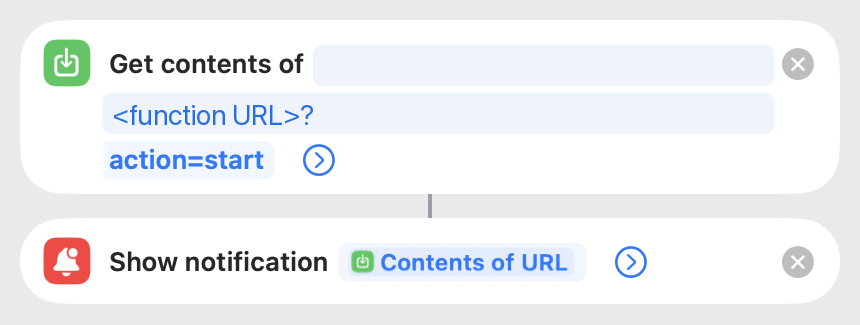
The Get contents of URL action carries a header Authorization: Bearer <token>, hidden behind the expand arrow. Opening WireGuard starts the VM, and I toggle the tunnel once the notification arrives. The start call blocks until the VM is up and the DNS record points at it, so the tunnel connects to the right IP. There’s no stop step: toggling the tunnel off is enough, as the next section explains.
Stopping itself Link to heading
I don’t want to remember to stop it, and stopping from one device would cut off another. A systemd timer on the VM runs idle-stop.sh every minute: if no client has completed a WireGuard handshake for 5 minutes, it calls the function’s stop with the token, so DNS gets parked too. A connected client handshakes about every two minutes, since WireGuard rekeys every two minutes and the 25-second keepalives count as traffic. An idle tunnel I held open handshook every 126 seconds. Toggling the tunnel off is all it takes, and the VM stops 5 or 6 minutes later. If the function call fails, the script falls back to poweroff, which GCP treats as a stop.
The VM has no service account, so it can’t stop itself through the Compute API. It holds a copy of the function token in a root-only file instead, which can only start or stop this VM.
How long it takes Link to heading
From a stopped VM, the function’s start returned in 34 to 51 seconds across three runs, one of them from the iPhone automation, and in an end-to-end test with the client in a Docker container (so it didn’t wait on a sudo prompt), traffic flowed 44 seconds after asking the VM to start. Stopping takes about a minute, and start during that window returns a 409.
Spot VMs can be reclaimed. The VM stops, the clients keep sending traffic into a dead tunnel, and I reconnect: vpn up on the laptop drops the old tunnel first, and on the phone I reopen WireGuard and toggle the tunnel.
What it costs Link to heading
These are list prices from the Cloud Billing Catalog API and Google’s network pricing page, fetched on 4 October 2026, in USD before tax. They’re my own sums, not a bill. Spot prices can change, up to once a month.
The baseline in London:
| Item | Price |
|---|---|
Spot f1-micro | $0.000864/hour |
| External IP on a spot VM | $0.0025/hour |
10 GB pd-standard disk | $0.48/month |
| Internet egress, Standard tier | first 200 GiB free, then $0.085/GiB |
| Function, secrets, image, builds | $0 within the free tiers |
| Stopped | $0.48/month |
| Running | ~$0.0034/hour |
| Running 24/7 | ~$2.94/month |
An hour a day comes to about $0.58/month. The 200 GiB of free Standard-tier egress is per billing account across all regions. The function uses a few dozen requests and well under an hour of CPU a month, against free allowances of 2 million requests and 180,000 vCPU-seconds, and its 48 MB image fits in Artifact Registry’s 0.5 GB free storage.
What the upgrades cost and buy Link to heading
I benchmarked all four combinations of machine type and network tier from my home connection, about 200 ms from London: time until traffic flowed, latency to 1.1.1.1 through the tunnel, and the average of three 25 MB downloads. Each ran once, so treat small gaps as noise.
| Setup | Extra cost | Traffic after | Latency | Download |
|---|---|---|---|---|
f1-micro, Standard (baseline) | none | 46s | 237 ms | 5.1 MB/s |
f1-micro, Premium | egress $0.12/GiB from the first GiB | 48s | 267 ms | 5.0 MB/s |
e2-micro, Standard | +$0.0035/hour, +$2.52/month 24/7 | 45s | 224 ms | 5.3 MB/s |
e2-micro, Premium | +$0.0035/hour and $0.12/GiB egress | 45s | 265 ms | 5.1 MB/s |
e2-microhas two shared vCPUs and 1 GB of RAM against thef1-micro’s 0.2 vCPU and 0.6 GB. WireGuard for a couple of devices didn’t need it: thef1-microsat at about 99% idle while carrying close to a gigabyte of my traffic. Google doesn’t publish a separate e2-micro SKU, so I priced it as 0.25 vCPU plus 1 GiB of RAM at the E2 spot rates.- Premium networking changes where traffic leaves Google’s network. On Premium, the default, packets ride Google’s private backbone and enter or leave the internet at the Google edge closest to the other end. On Standard, packets leave Google’s network in the VM’s region and cross the public internet the rest of the way, like most hosting providers. Premium came out 30 to 40 ms slower for me, with the same download speed. I’d guess the hop onto Google’s network near me and the backbone route to London is longer than the direct path, though I haven’t traced it. Premium might fare better from somewhere else.
Other regions Link to heading
I ran the baseline sums, a spot f1-micro with a 10 GB disk and an external IP, across the 43 regions that sell a spot f1-micro. Here’s a selection, ranked by 24/7 cost:
| Rank | Region | Per hour running | Stopped/month | 24/7/month |
|---|---|---|---|---|
| 1 | us-central1 (Iowa) | $0.0032 | $0.40 | $2.72 |
| 5 | europe-north2 (Stockholm) | $0.0033 | $0.40 | $2.79 |
| 6 | europe-west1 (Belgium) | $0.0033 | $0.40 | $2.79 |
| 8 | europe-north1 (Finland) | $0.0033 | $0.44 | $2.82 |
| 9 | us-west4 (Las Vegas) | $0.0033 | $0.44 | $2.83 |
| 14 | northamerica-northeast2 (Toronto) | $0.0033 | $0.44 | $2.87 |
| 23 | europe-west2 (London) | $0.0034 | $0.48 | $2.94 |
| 34 | europe-west10 (Berlin) | $0.0034 | $0.62 | $3.13 |
| 41 | europe-west3 (Frankfurt) | $0.0056 | $0.48 | $4.59 |
| 43 | me-central1 (Doha) | $0.0060 | $0.49 | $4.84 |
The external IP’s $0.0025/hour is most of the running cost everywhere, so most regions land within a few cents of each other. Frankfurt, Paris and Doha stand out: their spot f1-micro costs three to four times London’s. I’d pick the region for where you want your traffic to appear, then check the price. Standard-tier egress costs the same from every region.
The free tier doesn’t help here Link to heading
The free tier covers one non-spot e2-micro in us-west1, us-central1 or us-east1, plus 30 GB of standard disk. London and spot VMs fall outside it, and the allowance is one VM per billing account. If an exit in the US works for you, a free-tier VM running 24/7 is the cheaper route, and it isn’t preempted. I haven’t checked how the free tier treats the external IP.
Things that didn’t make the cut Link to heading
- A reserved static IP. It would remove the DNS step, but a reserved IP that isn’t attached to a running VM costs $0.012/hour, about $8.76/month, more than running the VM all month.
- Recreating the VM from a snapshot each time. Cheapest when idle, at a few cents a month, but slower to come up. The stopped VM’s disk costs $0.48/month and saves the rebuild.
- A smaller disk. The Debian image is 10 GB, and GCP won’t make a disk smaller than its source.
- Running WireGuard in Cloud Run. Cloud Run accepts HTTP, gRPC and WebSockets over TCP. WireGuard speaks UDP, and an instance only lives while it handles a request.
- Dropping the external IP. Cloud NAT only handles connections the VM opens, so clients couldn’t reach WireGuard at all.